
Review the tenant-wide settings across all three admin planes
Start with tenant-wide settings, because they cap every Copilot, agent and Foundry setting below them. Name an owner for each admin plane and review all three together. Allow a day for the first pass.
Copilot has three admin planes. The Microsoft 365 admin centre governs Microsoft 365 Copilot and its agents. The Power Platform admin centre governs Copilot Studio environments and data policies. Azure governs Foundry through subscriptions, policy and roles. Most organisations we work with have three different owners, so name each one.
Start with roles. Only Global Administrator and AI Administrator can install, approve and manage agents in the Microsoft 365 admin centre. Make AI Administrator eligible through Privileged Identity Management, give oversight staff AI Reader, and keep Global Administrator for break-glass. In Azure, Foundry User is the default for developers at project scope, and Microsoft describes Foundry Owner as highly privileged.
Agent settings are the biggest decision. Under Agents, Settings, turn external publishers off until each is assessed, limit user access to a pilot group (it defaults to all users), and route organisation-built agents through the approval queue. Microsoft's agreements don't cover data processed by non-Microsoft services, so external publishers need their own assessment.
Decide web search deliberately. Allow web search in Copilot is on when not configured, and Bing queries aren't covered by the Data Protection Addendum. For OFFICIAL: Sensitive and above, disable it or limit it to a named group after a privacy impact assessment. Keep Copilot Frontier and third-party model providers off outside a test group. Unpinning Copilot Chat doesn't block it.
In the Power Platform admin centre, restrict environment creation to named administrators, turn on environment routing so new makers land in a governed environment rather than Default, and set a tenant-wide data policy before anything new is built. Record any Generative AI cross-region data movement as a risk decision.
In Azure, assign policy at the management group and set three built-ins to Deny: key access disabled, restricted network access and approved models only. Add a DeployIfNotExists policy that sends diagnostic logs to Log Analytics.
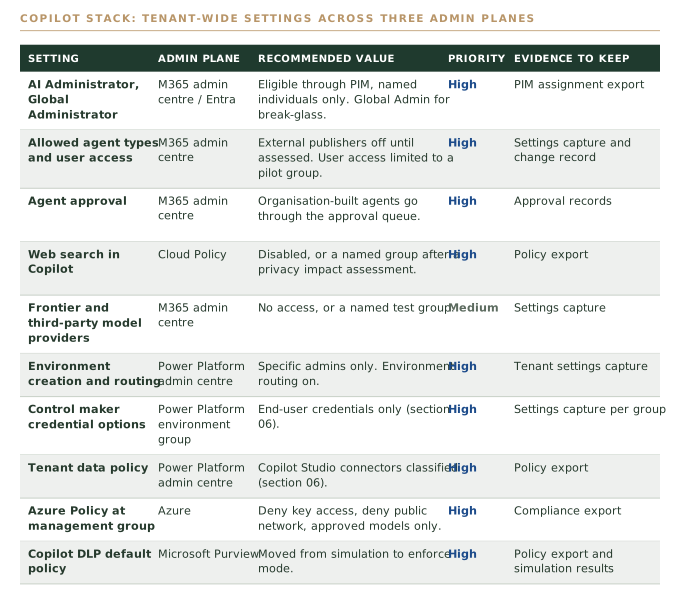
Assuming the settings approved at rollout are the settings you're running. Several defaults are open or audit-only, and Microsoft adds new settings monthly, so review the whole surface, not just the settings you changed.
Record which licence each control depends on
Licensing changes what you can enforce, so record it beside each setting. The highest-value controls need no extra licence, while runtime blocking for agents now sits largely behind Microsoft Agent 365.
Maker credential control, data policies, Azure Policy deny rules, keyless authentication and the web search setting need no additional licence that we identified. These are the controls to do first.
SharePoint Advanced Management, which gives you Restricted Content Discovery, data access governance reports and site access reviews, is included with a Microsoft 365 Copilot licence, though label-based reports need E5 or G5. Audit retention beyond 180 days needs Audit Premium. Defender's agent discovery, threat detection and real-time protection for Copilot Studio and Foundry agents moved to Microsoft Agent 365 from 1 July 2026.
Confirm each dependency against your own Microsoft agreement. A control you assumed you had, but aren't licensed for, is a gap you'll find at audit.
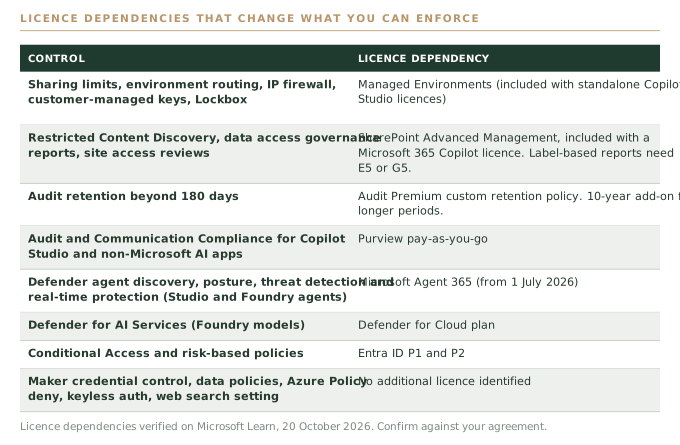
Relying on a Defender blocking rule that stopped blocking. When agent protection moved behind Agent 365, existing blocking rules stopped blocking for tenants without the new licence.
Check whether each tool shows activity or stops it
Most Copilot assurance tools show activity, and the tools that can stop it default to watching. Check each tool's mode, not just whether it's deployed, and make every move to blocking a tested, recorded decision.
An executive shown a populated Purview dashboard will reasonably conclude Copilot is governed, when the dashboard often reports risks nothing is acting on. In the tenants we review, this plays out four ways: most content carries no sensitivity label, policies created in simulation never moved to enforcement, Purview can't see what a connector did downstream, and nobody owns the review cycle.
Microsoft's defaults reinforce this. The default Copilot DLP policy starts in simulation. Defender's real-time protection for agents audits by default. Copilot Studio's external threat detection, in preview, allows a tool call if no decision arrives within one second unless set to block on error. The pre-publish security scan warns makers but doesn't block. Purview audit records omit prompt and response text.
Each default is reasonable on its own, because an untested blocking control can break legitimate work. The problem is cumulative. You can deploy every tool and still have nothing that stops a sensitive prompt, a risky tool call or an over-shared agent.
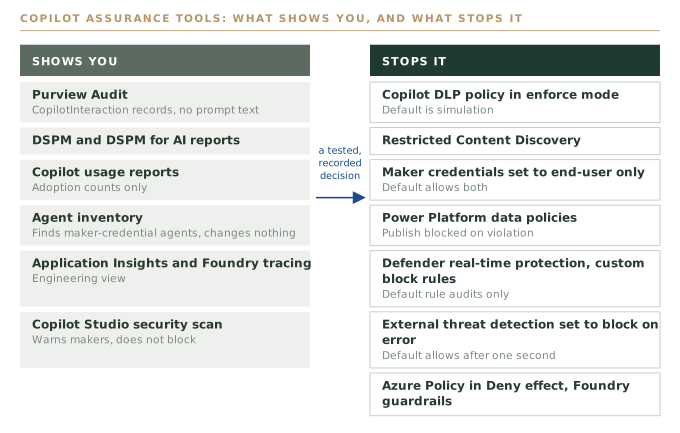
Showing the executive a Purview dashboard as proof of control. It proves visibility, and nothing on it tells you whether a single prompt or tool call was blocked.
Treat each Copilot surface as its own threat model
One brand covers three different reaches. Microsoft 365 Copilot reads what the user can read, a Copilot Studio agent acts with whoever's credentials it holds, and a Foundry agent acts with whatever identity, network and tools you give it.
Microsoft 365 Copilot grounds answers in Microsoft Graph with the signed-in user's permissions. The real risk is oversharing in SharePoint, OneDrive and Teams, which Copilot makes discoverable at the speed of a question.
Copilot Studio is a different order of risk. Agents call connectors, flows, HTTP endpoints and MCP servers, and publish to Teams, websites and other channels. An agent using its maker's connection lets every user act with the maker's access, which makes it an identity problem as much as an AI one.
Foundry has the highest reach because it's a development platform. Agents can be given managed identities, OpenAPI tools, MCP servers, code interpreter, web grounding and paths into your virtual networks. Microsoft's AI shared responsibility model leaves identity, access, data protection and governance with you, and your share grows from Copilot towards Foundry.
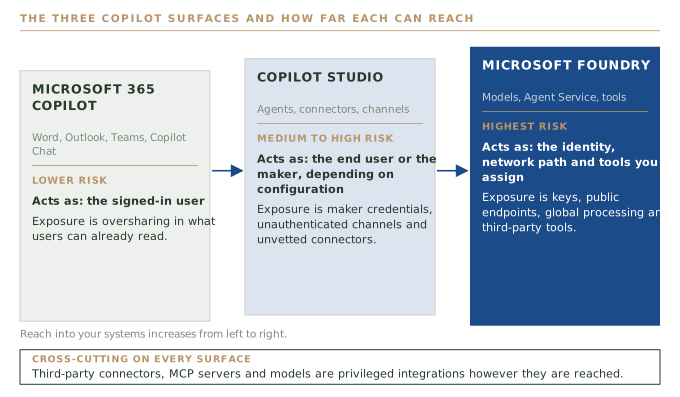
Writing one Copilot risk assessment. The same brand reaches very different amounts of your estate, so a single assessment either over-controls Microsoft 365 Copilot or under-controls Foundry.
Fix oversharing, then labels, then enforce Copilot DLP
Fix oversharing first, then apply sensitivity labels, then move the Copilot DLP policy from simulation to enforcement. Order matters, because a label-based DLP policy does nothing for unlabelled content.
Start with SharePoint Advanced Management, included with Microsoft 365 Copilot. Its data access governance reports show sharing links, content shared with Everyone Except External Users and label usage, and site access reviews ask owners to confirm access. Run both before widening Copilot access and keep the exports as evidence.
Where a site holds sensitive content while you fix it, apply Restricted Content Discovery. It removes the site from organisation-wide search and Copilot without changing permissions. Don't rely on Restricted SharePoint Search, because new enablement was blocked from 31 July 2026.
Copilot uses encrypted content only when the user holds VIEW and EXTRACT rights, and content it creates inherits the highest-priority source label. The default DLP policy detects Australian types, including tax file, Medicare, ABN, ACN and passport numbers, but starts in simulation. Review the results, then enforce once it won't block legitimate work.
Copilot connectors (formerly Graph connectors) extend Copilot's reach. Choose Only users with access to the content, get data-owner sign-off, and schedule full crawls, because incremental crawls don't update access control lists. Microsoft states that some prompt injections might still evade its classifiers, so treat externally shared content as untrusted.
The order holds in every sector, whether a super fund preparing for a CPS 234 review or a health service with patient correspondence in shared mailboxes.
Enforcing a label-based DLP policy over a tenant where most content carries no label. The posture report lights up and the policy has almost nothing to act on.
Inventory and migrate Copilot Studio agents running on maker credentials
Set Control maker credential options to end-user credentials only, but inventory and migrate affected agents first. The setting applies immediately to every agent in the environment, and most of the risk we see sits here.
When a maker adds a tool such as a SharePoint, Dataverse or SQL connector, they choose end-user or maker-provided credentials, and the default allows both. Share a maker-credential agent widely and every user acts with the maker's access. In the environments we review, this combines with hundreds of agents in the Default environment, no data policy, no Managed Environment and no inventory.
The agent inventory, in the Power Platform admin centre and Azure Resource Graph, records each agent's owner, authentication, channels, tenant-wide sharing and each tool's connection provider. Filter on a connection provider of Maker, export the list, and agree with each owner whether to retire the agent, rebuild it on end-user credentials or move it to a dedicated environment.
Then set End-user credentials at the environment group level, which overrides environment settings. Scheduled and autonomous agents will fail, because every trigger needs an active user, so find them first and decide how each one runs.
This pattern appears wherever business units adopted Copilot Studio before a platform team existed: a university faculty, a state agency programme area, a super fund's member services team.
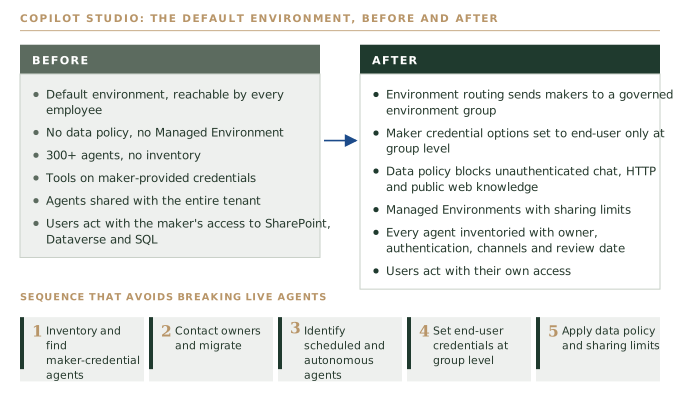
Flipping the maker credential setting before the inventory. Every scheduled and autonomous agent in the environment stops at once, and the business learns about the control from an outage.
Lock down Copilot Studio data policies and environments
Classify Copilot Studio connectors in data policies, block unauthenticated chat, and turn on Managed Environments with sharing limits. Data policies apply in real time and block publishing on violation.
Block Chat without Microsoft Entra ID authentication, which Microsoft says lets anyone with the link chat. Block or endpoint-filter HTTP and public website knowledge sources, and restrict channel connectors, including Direct Line (allowed by default), to the channels you use. Set agent authentication to Authenticate with Microsoft, or manual Entra ID where a design requires it.
Turn on Managed Environments for Default and every agent environment. This unlocks sharing limits (blocking security-group sharing and capping viewers), usage insights and maker welcome content. Sharing limits don't affect existing access, so the inventory clean-up in the previous step still has to happen.
Treat runtime protections as a backstop. Set external threat detection's error behaviour to Block the query so it fails closed. Defender's real-time protection for agents now needs an Agent 365 licence and custom block rules. Copilot Studio agents now get a Microsoft Entra Agent ID automatically, enabling Conditional Access on the agent, though it governs the agent's identity, not the maker's connection.
Treating Entra Agent ID and Conditional Access as the fix for maker credentials. They govern the agent's own identity, and an agent on a maker's connection still acts with the maker's access.
Decide Foundry identity, network and deployment type before production
Govern Foundry through Azure Policy, identity and network design before a project reaches production, because Foundry agents act with whatever identity, network path and tools you give them.
Azure AI Foundry became Microsoft Foundry in 2026 and many role and resource names changed, so check older runbooks and policies. Disable key authentication on every Foundry and Azure AI Services resource. The gateway may accept old keys for several hours after disabling, so test with an old key and keep the failed call as evidence. Assign Foundry User at project scope and Foundry Agent Consumer for applications that only call agents.
For agents touching internal data, use the Agent Service standard setup with your own storage, Azure AI Search and Cosmos DB, and inject the agent into a delegated subnet with public access disabled. Network injection can't be added to a hosted agent later, so decide at design time.
Data residency depends on deployment type. Global may process in any Azure region, Data Zone within a zone Microsoft can extend without notice, and Standard or Regional within the specified geography. Where in-country processing matters, use Standard regional deployments with the approved models policy.
Give each agent a custom guardrail with indirect attack detection at the tool response point, the likeliest route for injected instructions. Block Grounding with Bing Search and web search for regulated workloads, because they send data outside the Azure compliance boundary. Always set an allowed tools list for MCP servers, prefer managed identity for OpenAPI tools, and turn on Defender for AI Services.
Forgetting that publishing a Foundry agent creates a new Entra agent identity. Its roles need reassigning, so add that to the release checklist or the published agent won't match the one you tested.
Trial connectors, MCP servers, agents and models in a sandbox before release
Treat every connector, MCP server, store agent and catalogue model as untrusted until trialled. Microsoft checks ownership, authentication and availability, not security, so a sandbox trial is how a small team closes the gap.
Certified connectors are reviewed for API ownership, a supported authentication type, a support contact and an availability target. Custom connectors and MCP servers in Copilot Studio carry no vetting statement. Agent store requirements are publisher obligations with no stated testing, and Microsoft does not test or verify third-party MCP servers in Foundry. As far as we have found, nobody security-reviews these integrations for you.
Run the trial in a dedicated environment with its own data policy, or a separate Foundry project, with test accounts and synthetic data. Read the actions and scopes, or the MCP tool list, and refuse anything broader than the use case. Confirm it runs with end-user credentials or a scoped managed identity. Feed it a document with injected instructions and watch the tools. Ask the publisher where data is processed and for security attestations.
Make the trial the admin gate: nothing enters an allowed list without a trial record. Record the decision, release to a pilot, then widen, and re-test whenever the publisher changes it. This is our recommendation, not a Microsoft requirement.
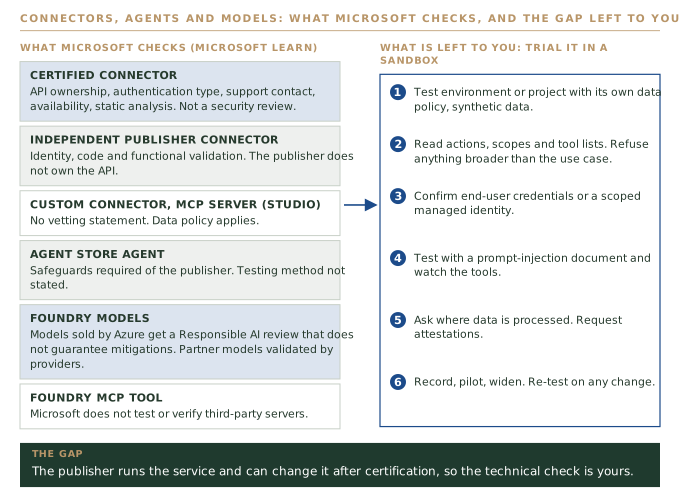
Treating certification as a security approval. It tells you who stands behind the integration, and the publisher can change the service after certification.
Map each audit question to the log that answers it
Logs are after-the-fact evidence spread across Purview, Power Platform, Azure and Defender, and none stops anything. Map each audit question to a source and test that it holds what you expect.
Purview Audit is the primary record. CopilotInteraction records capture who used Copilot or an agent, when, in which app, which files and labels were accessed, and jailbreak or injection flags. They omit prompt and response text, which sits in the user's Exchange Online mailbox and is searchable by eDiscovery. Audit Standard keeps 180 days.
Copilot Studio transcripts go to the Dataverse ConversationTranscript table, where a system job deletes them after 30 days unless replaced. Dataverse for Teams and developer environments write none. Application Insights covers tool calls, latency and errors, but it's an engineering tool, not an audit record.
For Foundry, diagnostic settings send audit and request logs to Log Analytics, the Activity Log records control-plane changes, and tracing records agent inputs, outputs and tool arguments, so treat traces as sensitive. Sentinel ingests Copilot activity into the CopilotActivity table.
The evidence an auditor will ask for is who used which agent, on which data, with whose credentials, and who changed which setting when.
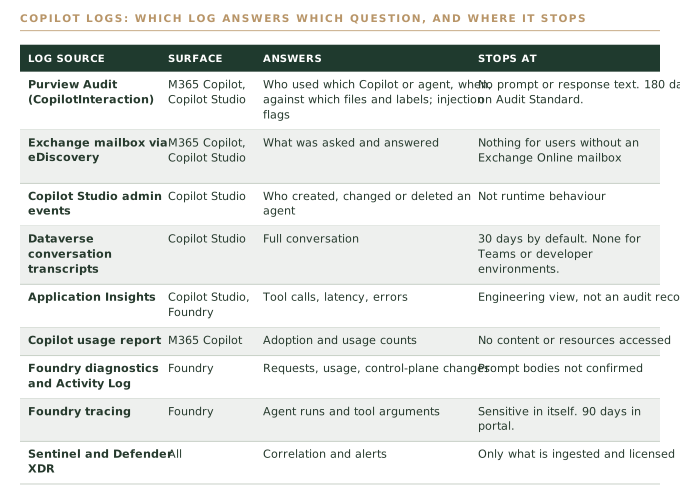
Discovering mid-investigation that Purview shows which file an agent read but not what its connector did next. Know the gaps before an auditor does.
Book the monthly review and file a dated evidence pack
Review the full settings surface monthly and keep a dated evidence pack. Microsoft ships new settings, agent types and defaults monthly, so your configuration drifts even when nobody touches it.
During the research for this guide alone, Microsoft blocked new Restricted SharePoint Search enablement, renamed Foundry roles, and moved Defender agent protection behind a new licence.
The monthly pass covers the tenant settings table, AI Administrator and Foundry role assignments, the agent inventory filtered for maker credentials and unauthenticated or tenant-wide shared agents, data policy violations, Copilot DLP mode, the approved models list and log delivery to the SIEM. Read the month's Microsoft 365 message centre and release notes, and add new settings with a decision recorded.
Quarterly, compare the deployed configuration with your approved baseline and re-test approved connectors. Annually, revisit each surface's threat model and refresh the framework mapping. The evidence pack is dated exports: role assignments, agent inventory, data and DLP policies, Azure Policy compliance, log ingestion checks, and a ticket and trial record for each approval. Name an owner and a backup.
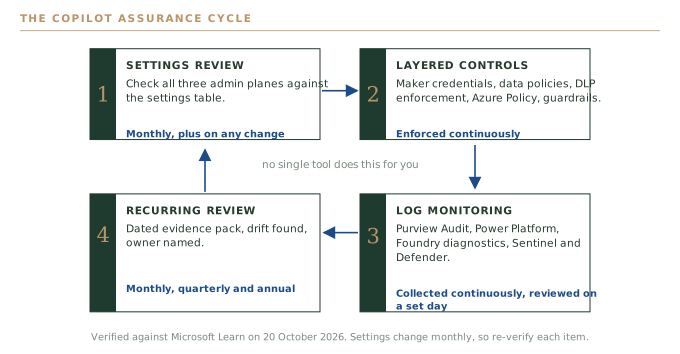
Making the review one person's job with no backup. If they leave or go on leave, the review stops, and the drift shows up at the next audit.
Map the evidence to the Essential Eight, the ISM and CPS 234
Each control contributes to a framework outcome, and none alone makes you compliant. Map each control, say where the fit is by analogy, and keep the evidence.
For the Essential Eight, cite your target maturity level. PIM-eligible administrator roles support restricting administrative privileges, and Conditional Access with phishing-resistant MFA supports multi-factor authentication. Allowed agent types, data policies and approved models are application control only by analogy, so say so in your evidence. ASD released ASD Essentials on 15 October 2026; existing obligations stand until regulators say otherwise.
For the ISM, map to the release in force at assessment. The September 2026 release adds 44 controls, including a unique identity and a register for every AI agent, least-privilege agent tools and central tool-call logging. The agent inventory, Entra Agent ID, end-user credentials, tool-response guardrails and Purview and Foundry logging each contribute.
For APRA CPS 234, the relevant outcomes are assessing third parties that manage your information assets (paragraph 16), systematic control testing (paragraphs 27 to 31) and notifying APRA within 72 hours of a material incident (paragraph 35). Under CPS 230, Copilot will often be a material service provider. APRA's April 2026 letter on AI expects an AI inventory, fourth-party visibility and identity controls for agents.
Beyond these, PSPF 2025 and the DTA's responsible AI policy require an AI use case register the agent inventory can feed. Connect controls to APP 11 of the Privacy Act 1988, with automated decision-making transparency obligations starting 10 December 2026. Critical infrastructure entities should include Copilot agents touching operational data in their SOCI Act Part 2A risk management program.
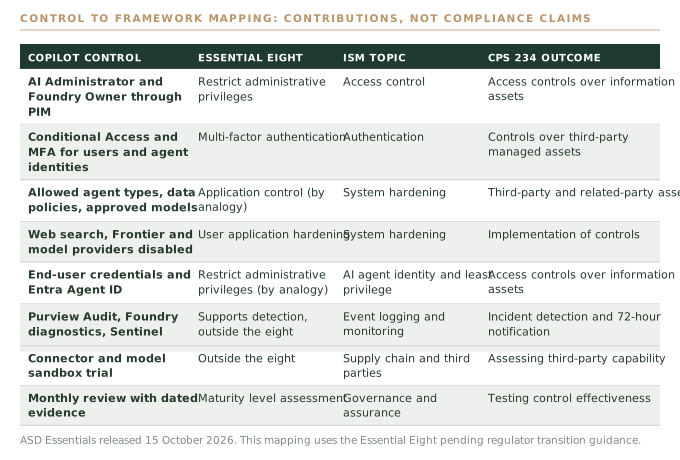
Writing 'compliant' in the register. Record what each control contributes and where the fit is by analogy, so the register doesn't overstate your position.
One-page checklist by area
| Area | Check | Step | |
|---|---|---|---|
| 01 | Tenant-wide | AI Administrator, Global Administrator and Foundry Owner held through PIM by named individuals | 1 |
| 02 | Tenant-wide | External publishers off until assessed, user access limited, organisation-built agents through the approval queue | 1 |
| 03 | Tenant-wide | Web search, Frontier and third-party model providers off or limited to a named group | 1 |
| 04 | Tenant-wide | Environment creation restricted, environment routing on, cross-region movement recorded as a risk decision | 1 |
| 05 | Tenant-wide | Azure Policy at management group: key access disabled, network restricted, approved models only, diagnostic logs deployed | 1 |
| 06 | Tenant-wide | Licence dependencies recorded against each control | 2 |
| 07 | Microsoft 365 Copilot | Data access governance reports run and site access reviews completed before access is widened | 5 |
| 08 | Microsoft 365 Copilot | Restricted Content Discovery on sensitive sites pending permission fixes | 5 |
| 09 | Microsoft 365 Copilot | Copilot DLP default policy reviewed in simulation and moved to enforcement | 5 |
| 10 | Microsoft 365 Copilot | Copilot connectors set to only users with access, with full crawls scheduled | 5 |
| 11 | Copilot Studio | Agent inventory exported; maker-credential, unauthenticated and tenant-wide shared agents identified | 6 |
| 12 | Copilot Studio | Scheduled and autonomous agents identified, then end-user credentials set at environment group level | 6 |
| 13 | Copilot Studio | Data policy blocks unauthenticated chat, HTTP and public website knowledge; channels restricted | 7 |
| 14 | Copilot Studio | Managed Environments on Default and agent environments, with sharing limits set | 7 |
| 15 | Microsoft Foundry | Key-based authentication disabled and tested with an old key | 8 |
| 16 | Microsoft Foundry | Standard setup with private networking; Standard regional deployments where in-country processing matters | 8 |
| 17 | Microsoft Foundry | Custom guardrail per agent, Bing grounding blocked, MCP allowed tools list set, roles reassigned on publish | 8 |
| 18 | Integrations | Each connector, MCP server, agent and model trialled with synthetic data and a trial record kept | 9 |
| 19 | Logs | Purview Audit exported to the SIEM, transcript retention set deliberately, Foundry traces access-restricted | 10 |
| 20 | Review | Monthly review held with a named owner and backup, and a dated evidence pack filed | 11 |
Common pitfalls
Purview, DSPM and the agent inventory show what Copilot is doing. Several of the controls that would stop it ship in simulation, audit-only or fail-open modes, so check each tool's mode as well as its deployment.
The setting applies immediately to every agent in the environment. Inventory, contact owners, find scheduled and autonomous agents, then switch, or the change arrives as an outage.
A label-based Copilot DLP policy can't act on content that carries no label. Fix oversharing and apply labels first, then move the policy to enforcement.
Microsoft checks ownership, authentication, support and availability. It doesn't security-test third-party MCP servers or most connectors, so trial each integration in a sandbox before release.
Keys grant full access with no role restrictions, and Global deployments may process in any Azure region. Disable keys, test with an old key, and use the approved models policy to stop a Global variant appearing quietly.
Each control contributes to an Essential Eight, ISM or CPS 234 outcome. Record what it supports and where the fit is by analogy, so the register doesn't overstate your position.
Frequently asked questions
Not for a regulated organisation. Microsoft 365 Copilot respects user permissions, but several controls that would stop risky activity ship in simulation, audit-only or fail-open modes, including the default Copilot DLP policy and Defender's real-time protection for agents. Web search is also on when not configured. Review the tenant-wide settings and make each move to enforcement a tested decision.
Agents running on maker-provided credentials. When a maker shares an agent that uses their own connection, every user acts with the maker's access to SharePoint, Dataverse or SQL. Inventory those agents, migrate them, then set Control maker credential options to end-user credentials only at the environment group level.
No. Certification checks API ownership, authentication type, a support contact and an availability target, and Microsoft states it doesn't test or verify third-party MCP servers in Foundry. As far as we have found, nobody security-reviews these integrations for you, so trial each one in a sandbox with synthetic data before release.
Audit Standard keeps CopilotInteraction records for 180 days. Longer retention needs an Audit Premium custom retention policy, and three to ten years needs the ten-year add-on. The records omit prompt and response text, which sits in the user's Exchange Online mailbox and is searchable through eDiscovery, so export to your SIEM on a schedule.
Each control contributes to an outcome rather than making you compliant. PIM supports restricting administrative privileges, Conditional Access supports MFA, and allowed agent types are application control only by analogy. For CPS 234, a monthly review with a dated evidence pack shows you tested controls, and Microsoft is a third party you need to assess. Confirm the mapping with your assessor.
Monthly, with a dated evidence pack, plus event-driven reviews for new connector or agent requests, licence or default changes and security advisories. Microsoft ships new settings and defaults monthly, so configuration drifts even when nobody changes it. Add a quarterly baseline comparison and an annual threat model refresh.
Todd Noller is Principal Consultant at Lumaris, an Australian-owned, vendor-neutral advisory firm specialising in AI, data, cyber security, cloud, and critical infrastructure. Todd is a delivery and operations leader who builds technology functions, governance frameworks, AI platforms, and the teams that run them. With over sixteen years across data, AI, and cyber delivery in regulated environments, Todd led the Complex Programs portfolio at a Defence prime: a ~$40M book of cyber transformation spanning federal digital identity, enterprise integration, and security uplift. Before that, he stood up an investment management firm's entire technology function from scratch across New York and Australia, launching multiple SaaS products to SEC, FINRA, APRA CPS 234, and GDPR compliance within two years. At the Department of Defence, he coordinated national-scale cyber incident responses and served as Business Product Owner for a real-time threat intelligence platform. Todd holds Microsoft Sentinel and Microsoft Azure Fundamentals certifications.
View LinkedIn profile