
Review the tenant-wide Claude.ai settings first
Start with the organisation-wide settings, because they cap everything below them. Limit Owners, require review before any connector is enabled, confirm data and identity settings, and date every capture.
Who: platform administrator with IT governance. Time: half a day. Open the Claude.ai organisation settings, export the member list with roles, and work through the settings table below. Team and Enterprise organisations have one Primary Owner, plus Owners, Admins and members, and Enterprise adds custom roles. Owners can enable features and integrations, so keep that group to named individuals.
Set one rule for connectors: an Owner enables nothing without a security review, a named owner and a ticket. Step 5 sets out that review. Then list every MCP server your developers use (ask them, and check project and user configuration on a sample of machines) and every Console or API key, with an owner, a purpose and a review date. Remove anything you can't attach an owner to.
For data, Anthropic states that it doesn't train models on Team, Enterprise or API customer data by default. Confirm that against your commercial terms, then check retention and export settings. Plan tier changes your evidence: Anthropic lists audit logs, SCIM provisioning, the Compliance API and custom data retention as Enterprise features. On Team, keep dated exports and captures, and confirm which SSO and spend-limit options apply to your plan.
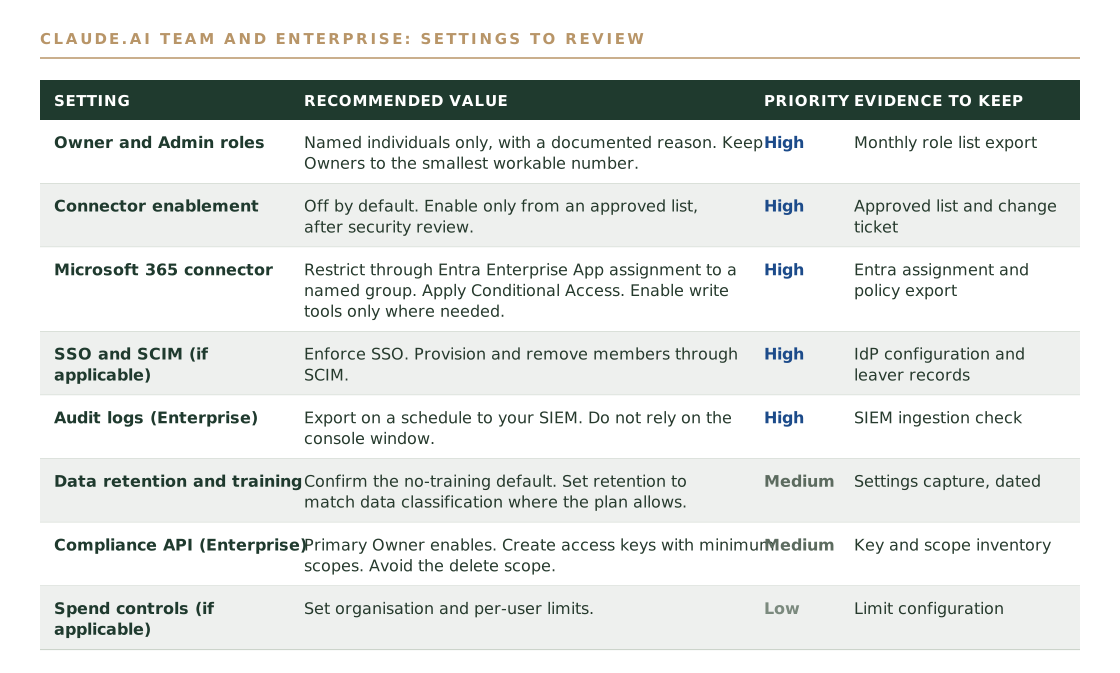
Assuming the settings you approved at rollout are the settings you are running. New settings can ship enabled by default, so re-check the whole page, not only the ones you changed.
Put the Microsoft 365 connector behind Entra
Restrict who can use the connector through Entra Enterprise App assignment, apply Conditional Access and keep write tools off unless a use case needs them. The connector only reaches what each user can already reach.
Who: Entra administrator. Time: two hours. An Owner enables the connector in Claude, then a Microsoft Entra Global Administrator completes one-time consent. After consent, assign the Enterprise App to a named security group and roll out group by group.
Apply Conditional Access with MFA and device compliance, as Anthropic's connector security guide recommends. Enable write tools such as sending email or Teams messages only where a use case needs them. Anthropic documents safeguards on write actions, including confirmation before sending, but the safer default is off.
Because the connector uses delegated permissions, Claude can only reach Microsoft 365 data that the user can already reach. That makes oversharing in SharePoint and mailboxes the real exposure. Run a sharing review on the sites and mailboxes your pilot group can reach before you widen access.
Treating the connector as the risk. The exposure is usually broad SharePoint or mailbox permissions that existed long before Claude, so fix those first.
Deploy the tenant-wide Claude Code policy
Deliver a managed policy through server-managed settings or your MDM tool so users can't override it, then prove it loaded on a real machine with /status and claude doctor.
Who: endpoint or platform engineer. Time: one day, including a pilot. Anthropic documents four delivery routes: server-managed settings from the claude.ai admin console (Team and Enterprise, refreshed hourly), an MDM plist or Windows registry policy, a managed-settings.json file, and the Windows user registry, which is writable without elevation and so isn't an enforcement channel.
The file paths are /Library/Application Support/ClaudeCode/ on macOS, /etc/claude-code/ on Linux and WSL, and C:\Program Files\ClaudeCode\ on Windows. Anthropic's documentation says Claude Code no longer reads the older C:\ProgramData\ClaudeCode path, so update any older deployment script.
Start with these keys: permissions.disableBypassPermissionsMode set to disable, allowManagedPermissionRulesOnly, allowManagedHooksOnly, allowManagedMcpServersOnly and sandbox.network.allowManagedDomainsOnly. Add your own permission deny rules for anything you never want attempted. Set a minimum Claude Code version so older builds can't run.
Verify on a pilot machine. Run /status and read the Setting sources line, which names the managed source that won. Run claude doctor to list any entries Claude Code rejected. Then try to break the policy from a developer account, for example by starting a session with --dangerously-skip-permissions, and confirm the policy holds.
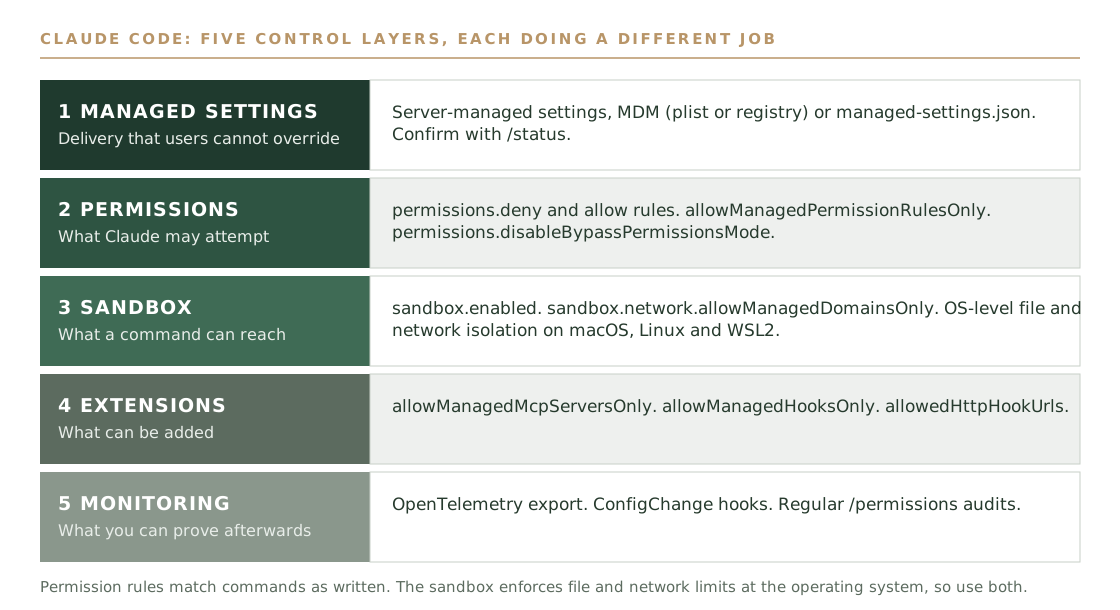
Putting managed-only keys in a user or project settings file. They won't take effect there, so the file looks right and gives you no protection. Test the policy by trying to break it.
Capture logs and telemetry before anyone asks for them
Send the evidence your plan produces to your SIEM: Enterprise audit logs or the Compliance API, Claude Code OpenTelemetry, and Console key and configuration events. Logs are evidence, not a runtime control.
Who: security operations. Time: one day. On Enterprise, Owners export audit logs from Organization settings under Data and Privacy. Anthropic's help centre describes the export as covering the past 180 days and excluding chat content, so schedule exports rather than relying on the console. One third-party guide advises setting audit log retention to permanent. Don't assume that.
For programmatic access, the Primary Owner enables the Compliance API under Organization settings, then API, and creates access keys with the minimum scopes. Avoid the delete scope unless a documented process needs it. Standalone Console organisations enable it under Settings, then Security, and an Admin API key reaches the Activity Feed only.
For Claude Code, set the OpenTelemetry destination in managed settings so developers can't redirect it. Prompt and tool content is redacted by default. Add ConfigChange hooks to audit or block settings changes mid-session.
Know the gaps before an auditor does. Anthropic lists Claude Code cloud sessions, some Microsoft 365 applications and sessions on Amazon Bedrock or Google Vertex AI as not covered by the Compliance API, and states that Public Sector organisations are excluded. API-tier usage needs its own logging.
Treating OpenTelemetry as your audit log. It is valuable for usage, cost and permission decisions, but it doesn't replace compliance audit logging.
Vet marketplace connectors and plugins in a sandbox before release
Treat every marketplace listing as untrusted until you have trialled it. Anthropic's Verified label means tested for quality and compatibility, not security audited, so trial each connector in a sandbox before releasing it.
Who: security lead with the platform administrator. Time: one to two hours per connector. Anthropic's marketplace at claude.com/marketplace/connectors-plugins lists connectors and plugins from Anthropic and trusted partners (about 885 connectors and 341 plugins when we checked, and the numbers change). Listings carry a label, but the marketplace page doesn't explain what the label involves.
Anthropic's connector documentation describes three labels. Verified means Anthropic tested the tools for quality and compatibility, and the connector met its Software Directory Policy at the time of review. Community means a third party built it and Anthropic screens it but hasn't reviewed it in depth. Custom means your own team added it by URL and nobody has reviewed it. Once connected, a Community connector has the same access as any other.
What Anthropic checks is tool design (separate read and write tools, accurate descriptions and annotations), prompt-injection patterns in tool descriptions, functional quality and API ownership. Plugins get an automated scan for behaviour they don't disclose, such as sending data elsewhere, and each new version is rescanned. Anthropic states that verification isn't a security audit or a guarantee, that the developer operates the connector and can change its tools after review, and that it doesn't control how third-party servers handle your data.
That gap is yours, and nobody else closes it. A full technical audit of every server is unrealistic for most organisations, but a sandbox trial is realistic. This is our recommended practice, not an Anthropic requirement. Trial each connector in a test organisation or small pilot group, with test accounts and synthetic data. Read the permission scopes and refuse anything broader than the use case. List the tools and check that read and write are separate. Test with a document that contains injected instructions and watch what the tools do. Ask the vendor where data is processed and for security attestations. Record the decision, release to a pilot group, then widen. Re-test when the connector or its tools change.
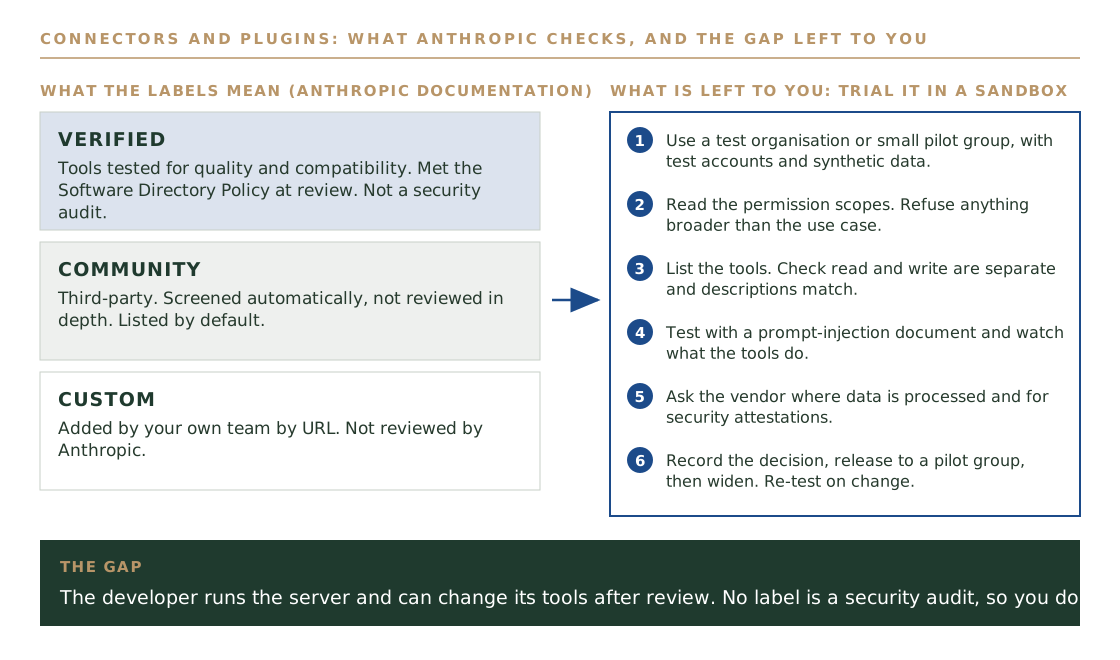
Treating the Verified label as a security approval. It is a quality and compatibility check, and the developer can change the tools afterwards.
Turn on the sandbox and close the network gap
Enable the sandbox and restrict network domains, because permission rules match commands as written. A denied WebFetch doesn't stop curl or wget through Bash, but a sandbox network allowlist does.
Who: platform engineer. Time: half a day. Permission rules decide what Claude may attempt. The sandbox enforces file and network limits at the operating system. Set sandbox.enabled and list the domains your developers genuinely need, such as your package registries and source host, in the managed allowed domains.
Anthropic documents the sandbox on macOS, Linux and WSL2, and states that native Windows isn't supported. If you run Windows laptops, choose WSL2, dev containers or virtual machines for Claude Code, and confirm the managed policy reaches those sessions. WSL reads only the Linux path unless wslInheritsWindowsSettings is set in an admin-only Windows source.
Expect some friction. A strict domain allowlist will block a build that pulls from an unlisted host. Pilot with one team and add domains through change control.
Turning on the domain lock with an empty allowlist. Developers lose access to package registries and either stop using the tool or look for a way around it.
Lock down MCP servers, hooks and secrets
Allow only vetted MCP servers, give each its own credentials and keep secrets out of CLAUDE.md, skills, hooks and committed configuration. Anthropic doesn't security-audit MCP servers, so the decision is yours.
Who: security lead and platform engineer. Time: half a day, then per request. Use allowManagedMcpServersOnly with a managed allowlist of servers that passed the step 5 trial, and add allowedHttpHookUrls to restrict where HTTP hooks can post. For each approved server, record the owner, the data it reaches and the permissions it asks for.
Use separate credentials for each server and each environment, so a development token can't reach production and one leak has one owner and one fix. Store credentials in your secrets manager and pass them in at run time.
Cloned repositories can carry configuration. Check Point Research disclosed flaws in which a malicious repository could run commands through project hooks and MCP configuration, and could send a Claude Code API key to an attacker's endpoint before the trust prompt appeared. Public reporting lists CVE-2025-59536 as fixed in version 1.0.111 and CVE-2026-21852 in 2.0.65. Verify current advisories against the minimum version you set in step 3.
Approving an MCP server because it looks official. Anthropic reviews connectors against its listing criteria but doesn't security-audit or manage any MCP server.
Run Claude Code safely in CI
Give each pipeline job a fixed working directory, bounded turns, timeout and cost, named tools and network destinations, and minimum permissions. Treat pull request and issue text as untrusted input.
Who: pipeline owner. Time: one to two hours per pipeline. Anthropic's documentation notes that trust verification is disabled when Claude Code runs non-interactively with the -p flag, so the prompts that protect a developer at a terminal don't protect a pipeline. The limits have to be written into the job.
Set a maximum number of turns, a timeout and a cost cap. List the tools the job may use and the network destinations it may reach. Give the job credentials that can do only what that job needs, and keep it away from production and deployment secrets.
Text from pull requests, issues and commit messages is attacker-controllable. Don't let a job that reads that text also hold write access to anything important. A GitHub advisory for the Claude Code Action covers a malicious MCP server configuration in pull requests, so keep the action version current.
Using the same job and the same token for review and for deployment. A prompt injected through an issue then inherits deployment rights.
Book the monthly review and file the evidence pack
Review the full settings surface every month, name an owner and a backup, and file a dated evidence pack each time. Add reviews for new connector requests, major Claude Code versions and relevant advisories.
Who: security lead. Time: half a day a month. The monthly pass covers the tenant settings table, the Owner and Admin list, the connector list and its trial records, the key inventory, and a check that the Claude Code policy still loads, using /status and claude doctor on a sample machine. Each quarter, compare the deployed policy with your approved baseline and re-test approved connectors. Each year, revisit the threat model for every surface.
The evidence pack is dated exports and captures: role lists, connector lists, Entra assignment and Conditional Access exports, /status and claude doctor output, SIEM ingestion checks and a ticket and trial record for each connector approval. Keep it where your auditor can read it.
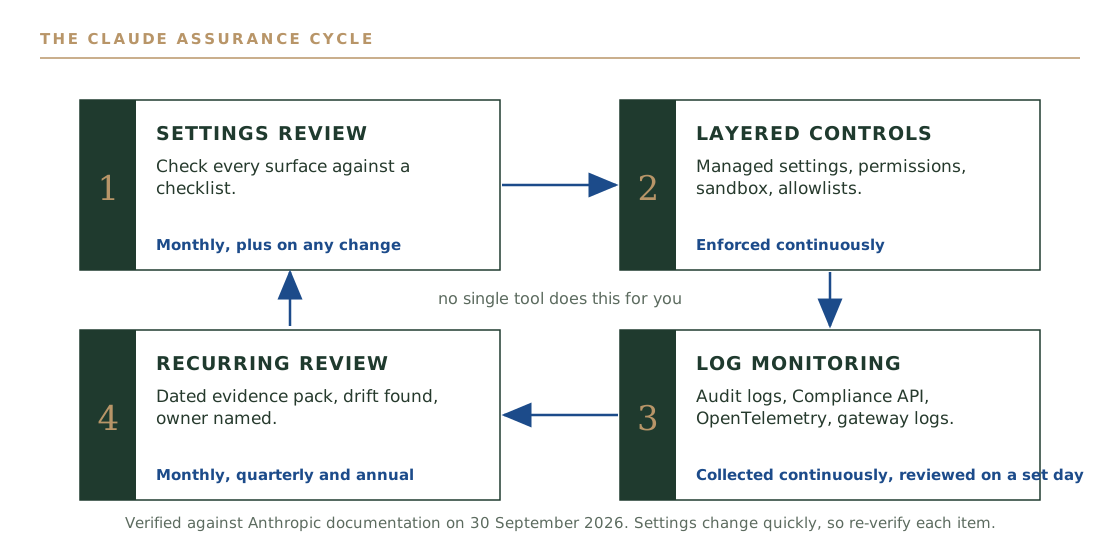
Making the review one person's job. If they leave or go on leave, the review stops, and the gap shows up at the next audit.
Map the evidence to the Essential Eight, the ISM and CPS 234
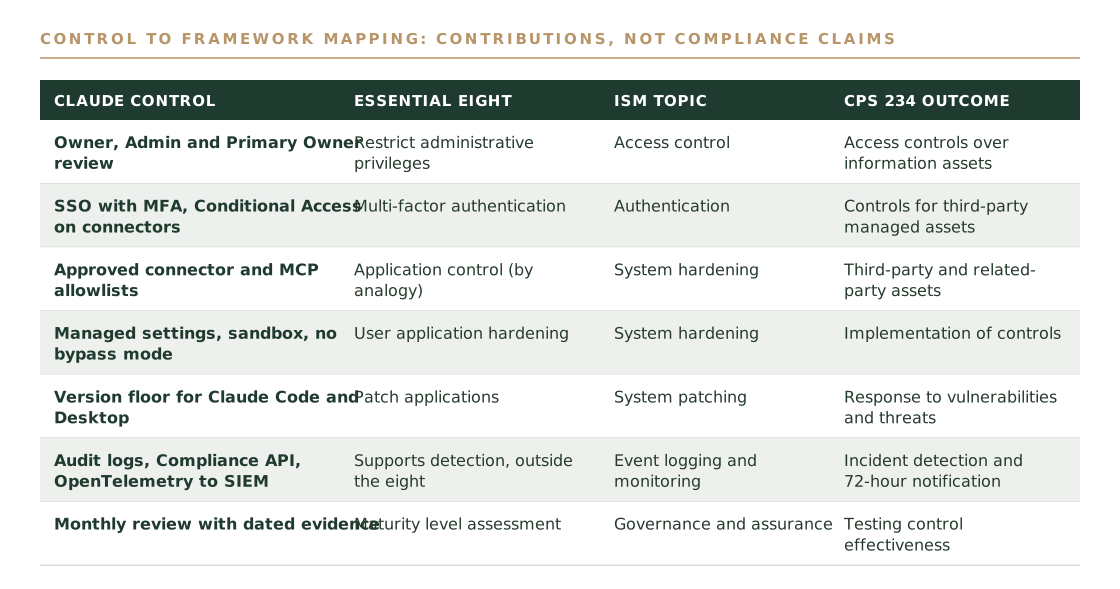
Map each control to the outcome it supports and don't claim more than the control does. Each control contributes to a framework outcome, and none of them alone makes an organisation compliant.
Who: security lead, with your assessor. Time: half a day. For the Essential Eight, cite your target maturity level. Reviewing Owners supports restricting administrative privileges, SSO with MFA and Conditional Access support multi-factor authentication, a minimum Claude Code version supports patching applications, and managed settings with the sandbox support user application hardening. Connector and MCP allowlists are application control only by analogy, so say so in the register.
For the ISM, map to the release in force at your assessment and confirm specific controls with your assessor. For APRA CPS 234, the relevant outcomes include controls over assets managed by third parties, testing that controls are effective, and notifying APRA within 72 hours of a material information security incident. Confirm the detail against the current standard on apra.gov.au.
Writing 'compliant' in the register. Record what the control contributes and what remains outside Claude's configuration.
One-page checklist by surface
| Surface | Check | Evidence to keep | |
|---|---|---|---|
| 01 | Tenant: Claude.ai | Owner and Admin lists limited to named individuals | Monthly role export |
| 02 | Tenant: Claude.ai | Retention, training and export settings confirmed, SSO and SCIM status recorded | Dated settings capture |
| 03 | Tenant: Claude.ai | No connector enabled without a review record, a named owner and a ticket | Approved list and change tickets |
| 04 | Tenant: Microsoft 365 | Connector restricted by Entra assignment and Conditional Access, SharePoint sharing reviewed | Entra exports |
| 05 | Tenant: Claude Code | Managed policy loads on a sample machine, bypass mode disabled, minimum version set | /status and claude doctor output |
| 06 | Tenant: logging | Audit export or Compliance API, and OpenTelemetry, feeding the SIEM | SIEM ingestion check |
| 07 | Marketplace | Each connector or plugin trialled in a sandbox with test data before release | Trial record |
| 08 | Marketplace | Permission scopes, tool list and vendor data handling recorded for each approval | Connector register |
| 09 | Claude Code | Sandbox on, network domains restricted, WSL2 or containers on Windows | Policy file and pilot result |
| 10 | MCP and secrets | Managed allowlist only, separate credentials per server and environment | MCP register |
| 11 | CI pipelines | Fixed directory, bounded turns and cost, named tools and destinations | Job definitions |
| 12 | API and Console | Admin API keys inventoried, rotated and revoked when an owner leaves | Key inventory |
| 13 | Review | Monthly review held, with a named owner and backup | Dated evidence pack |
Common pitfalls
Verified means Anthropic tested the tools for quality and compatibility. The developer still runs the server and can change its tools after review. Trial each connector in a sandbox before release.
Keys that only apply in managed settings won't take effect in a user or project file. The file looks correct and protects nothing. Confirm with /status and claude doctor, and test from a developer account.
Permission rules match commands as written. A rule that blocks WebFetch doesn't block curl through Bash. Pair rules with the sandbox and a network domain allowlist.
Anthropic documents the sandbox on macOS, Linux and WSL2, and states that native Windows isn't supported. Choose WSL2, dev containers or virtual machines, and confirm the policy reaches them.
Settings, plan features and advisories change quickly. Date every check, keep the capture, and re-verify against current Anthropic documentation each month.
A control contributes to a framework outcome. Record what it supports and what sits outside Claude's configuration, so your register doesn't overstate the position.
Frequently asked questions
Not as far as we've found. Anthropic doesn't publish a single scanner for Claude configuration, so assurance comes from a manual settings review against a checklist, layered technical controls, log-based monitoring and a recurring review cycle. New settings can ship enabled by default, so re-review the full settings surface monthly.
No. Anthropic's documentation says Verified means the tools were tested for quality and compatibility and met its directory policy at the time of review, and that it isn't a security audit or a guarantee. The developer operates the connector and can change its tools after review. Community connectors are screened but not reviewed in depth, and Custom connectors are not reviewed.
Trial it in a test organisation or a small pilot group using test accounts and synthetic data. Review the permission scopes, check the tool list, test with injected instructions, ask the vendor where data is processed, then release to a pilot group before widening. This is our recommended practice, not an Anthropic requirement.
Deploy a managed-settings.json file through your MDM tool, or use server-managed settings from the claude.ai admin console. Nothing a user or project sets overrides managed settings, apart from a few stricter-value exceptions. The file sits at /Library/Application Support/ClaudeCode/ on macOS, /etc/claude-code/ on Linux and WSL, and C:\Program Files\ClaudeCode\ on Windows. Run /status to confirm it loaded and claude doctor to see any rejected entries.
Permissions decide what Claude Code may attempt, using allow, ask and deny rules. Sandboxing enforces filesystem and network isolation for Bash commands at the operating system level. A deny rule matches the command as written, so enforcement that doesn't depend on the command text needs the sandbox. Use both.
No. The Compliance API gives you activity, chat and file data as evidence after the fact, and it isn't a runtime control. On Enterprise plans the Primary Owner enables it under Organization settings > API and creates access keys with the minimum scopes, while standalone Console organisations enable it under Settings > Security. Anthropic's documentation lists Claude Code cloud sessions and sessions on Amazon Bedrock or Google Vertex AI as not covered.
As a planning estimate, allow two to four weeks for the first pass, including a pilot of the Claude Code policy, then about half a day a month for the review. The heaviest steps are the managed-settings pilot and the sandbox rollout, because they touch developer machines.
Todd Noller is Principal Consultant at Lumaris, an Australian-owned, vendor-neutral advisory firm specialising in AI, data, cyber security, cloud, and critical infrastructure. Todd is a delivery and operations leader who builds technology functions, governance frameworks, AI platforms, and the teams that run them. With over sixteen years across data, AI, and cyber delivery in regulated environments, Todd led the Complex Programs portfolio at a Defence prime: a ~$40M book of cyber transformation spanning federal digital identity, enterprise integration, and security uplift. Before that, he stood up an investment management firm's entire technology function from scratch across New York and Australia, launching multiple SaaS products to SEC, FINRA, APRA CPS 234, and GDPR compliance within two years. At the Department of Defence, he coordinated national-scale cyber incident responses and served as Business Product Owner for a real-time threat intelligence platform. Todd spent three years as a Palantir specialist, including as Country Manager for Palantir's Australian deployments. Bachelor of Information Technology (Web and Mobile Technologies), Deakin University. Diploma in Project Management. CISM (ISACA, in progress). Microsoft Sentinel, Microsoft Azure Fundamentals, SANS Incident Handling, Palantir Foundry.
View LinkedIn profile